Python API guide
Use the Python API to discover processes, submit requests, monitor jobs, and
open their results. Start with installation and
configuration and login. The examples below use the
profile saved by sen4cap-client configure and credentials saved by
sen4cap-client login.
Run the Python blocks below in order in the same Python session or notebook.
Each step defines a small function and then calls it, reusing the same client
and the job_id returned by submission. Start from the repository root in the
development environment so the example request file can be found.
The functions and calls are maintained in the
API example.
The original notebook
is also available for interactive exploration.
Create a client
The examples use create_client() to load the saved service configuration and
credentials. Construction does not contact the service or prompt for login.
Service calls authenticate using the resolved credentials; call client.login()
first if interactive authentication is needed. Explicit keyword arguments can
override configuration values; see the configuration reference.
Import the dependencies and create the client:
from gavicore.models import JobStatus, ProcessRequest

from sen4cap_client.api import create_client


client = create_client()
Discover processes
List available processes, then inspect a process's inputs and outputs:
def inspect_process(client, process_id):
    processes = client.get_processes()
    print(processes.model_dump_json(indent=2))

    process = client.get_process(process_id=process_id)
    print(process.model_dump_json(indent=2))
    return process
Call the function with the client and the process ID:
process_id = "218"
inspect_process(client, process_id)
This guide uses process 218 and the NDVI request from the original notebook.
Process IDs, input IDs, and available outputs depend on the service. Check its
process description and adapt the request before submitting it.
Prepare and submit a request
The example request selects dates, NDVI, an area of interest, and an output returned by reference. It is maintained in ndvi-request.json:
{
  "inputs": {
    "startdate": "2024-06-01",
    "enddate": "2024-06-07",
    "indicatorname": "NDVI",
    "geom": "POLYGON ((9.66 53.75,10.38 53.75,10.38 53.35,9.66 53.35,9.66 53.75))"
  },
  "outputs": {
    "stacitemsfile": {
      "format": {"mediaType": "application/json"},
      "transmissionMode": "reference"
    }
  }
}
Load the JSON as a ProcessRequest and submit it. Submission starts a job and
returns its information without waiting for processing to finish. Retain the
returned jobID for subsequent calls:
def submit_process(client, process_id, request_path):
    request = ProcessRequest.model_validate_json(
        request_path.read_text(encoding="utf-8")
    )
    job = client.execute_process(process_id=process_id, request=request)
    print(job.model_dump_json(indent=2))
    return job.jobID
Call it with the request file's path. Run this call once to create the job:
from pathlib import Path

request_path = Path("examples/guides/ndvi-request.json")
job_id = submit_process(client, process_id, request_path)
Monitor the job and inspect results
Use the job_id returned above to inspect the same job. While the job is
accepted or running, repeat the inspect_results(client, job_id) call later;
do not repeat the submission call. If it fails or is dismissed, inspect the
job information before submitting another request.
def inspect_results(client, job_id):
    job = client.get_job(job_id=job_id)
    print(job.model_dump_json(indent=2))
    if job.status != JobStatus.successful:
        print("Results are available only after the job is successful.")
        return None

    results = client.get_job_results(job_id=job_id)
    print(results.model_dump_json(indent=2))
    return results
results = inspect_results(client, job_id)
client.get_jobs() lists jobs. To cancel a running job or delete a finished
one, use client.dismiss_job(job_id); see the CLI guide
for the corresponding command.
Open and plot an asset
For the example process, the output links to a STAC item. Its assets identify
the available data products. open_job_result() opens the selected SNDVI
asset as an xarray data array. The asset must expose alternate.s3.href, and
the STAC and raster URLs must be accessible independently of the processing
API's authentication. Other processes may have different asset names or result
types. For multiple outputs, pass output_name to open_job_result().
open_job_result() polls accepted/running jobs and can raise TimeoutError;
use its timeout and poll_interval options to control waiting. Failed or
dismissed jobs raise a job-status error. The example below is called after the
job has succeeded.
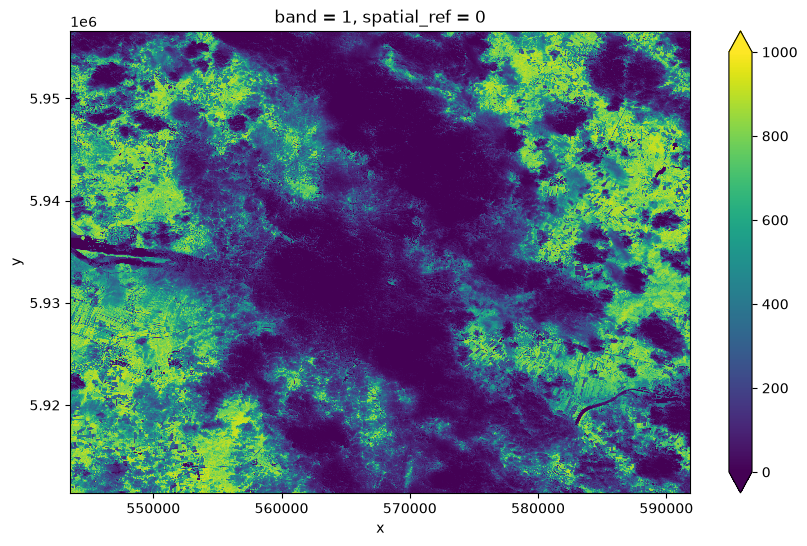
def plot_result(client, job_id, asset_name="SNDVI"):
    import matplotlib.pyplot as plt

    data_array = client.open_job_result(job_id=job_id, asset_name=asset_name)
    try:
        data_array.isel(band=0).plot.imshow(figsize=(10, 6), vmin=0, vmax=1000)
        plt.show()
    finally:
        data_array.close()
Once inspect_results returns results, plot the asset for that same job:
if results is not None:
    plot_result(client, job_id, asset_name="SNDVI")
Plotting requires Matplotlib, which is included in the development environment. The image below is a saved result from the original example; a new job's result can differ.
Close the client
When you have finished inspecting and plotting results, close the client:
client.close()
In a script, put the calls in a try block and client.close() in its finally
block so the client is also closed if a request fails. The example_session()
function in the source file demonstrates this pattern.
Optional: run the functions from a terminal
The same source file provides Typer commands that create and close a client and call the functions introduced above. These are an alternative to the Python session. Run only the stage you need from the repository root:
| Command | Function called |
|---|---|
inspect |
inspect_process |
submit |
submit_process |
results |
inspect_results |
results --plot |
inspect_results, then plot_result if results are ready |
python examples/guides/api.py inspect 218
To submit a new job:
python examples/guides/api.py submit 218 examples/guides/ndvi-request.json
Replace YOUR_JOB_ID with the ID printed by submission to inspect that job:
python examples/guides/api.py results YOUR_JOB_ID
Once the job succeeds, inspect and plot its result:
python examples/guides/api.py results YOUR_JOB_ID --plot --asset SNDVI
See the API reference for the client interfaces, or the App guide to explore processes visually.